
6.8 可滚动组件子项缓存 KeepAlive
本节将介绍一种在可滚动组件中缓存指定子项的通用方案。
首先回想一下,在介绍 ListView 时,有一个addAutomaticKeepAlives 属性我们并没有介绍,如果addAutomaticKeepAlives 为 true,则 ListView 会为每一个列表项添加一个 AutomaticKeepAlive 父组件。虽然 PageView 的默认构造函数和 PageView.builder 构造函数中没有该参数,但它们最终都会生成一个 SliverChildDelegate 来负责列表项的按需加载,而在 SliverChildDelegate 中每当列表项构建完成后,SliverChildDelegate 都会为其添加一个 AutomaticKeepAlive 父组件。下面我们就先介绍一下 AutomaticKeepAlive 组件。
6.8.1 AutomaticKeepAlive
AutomaticKeepAlive 的组件的主要作用是将列表项的根 RenderObject 的 keepAlive 按需自动标记 为 true 或 false。为了方便叙述,我们可以认为根 RenderObject 对应的组件就是列表项的根 Widget,代表整个列表项组件,同时我们将列表组件的 Viewport区域 + cacheExtent(预渲染区域)称为加载区域 :
- 当 keepAlive 标记为 false 时,如果列表项滑出加载区域时,列表组件将会被销毁。
- 当 keepAlive 标记为 true 时,当列表项滑出加载区域后,Viewport 会将列表组件缓存起来;当列表项进入加载区域时,Viewport 从先从缓存中查找是否已经缓存,如果有则直接复用,如果没有则重新创建列表项。
那么 AutomaticKeepAlive 什么时候会将列表项的 keepAlive 标记为 true 或 false 呢?答案是开发者说了算!Flutter 中实现了一套类似 C/S 的机制,AutomaticKeepAlive 就类似一个 Server,它的子组件可以是 Client,这样子组件想改变是否需要缓存的状态时就向 AutomaticKeepAlive 发一个通知消息(KeepAliveNotification),AutomaticKeepAlive 收到消息后会去更改 keepAlive 的状态,如果有必要同时做一些资源清理的工作(比如 keepAlive 从 true 变为 false 时,要释放缓存)。
我们基于上一节 PageView 示例,实现页面缓存,根据上面的描述实现思路就很简单了:让Page 页变成一个 AutomaticKeepAlive Client 即可。为了便于开发者实现,Flutter 提供了一个 AutomaticKeepAliveClientMixin ,我们只需要让 PageState 混入这个 mixin,且同时添加一些必要操作即可:
1class _PageState extends State<Page> with AutomaticKeepAliveClientMixin {
2
3
4 Widget build(BuildContext context) {
5 super.build(context); // 必须调用
6 return Center(child: Text("${widget.text}", textScaleFactor: 5));
7 }
8
9
10 bool get wantKeepAlive => true; // 是否需要缓存
11}代码很简单,我们只需要提供一个 wantKeepAlive,它会表示 AutomaticKeepAlive 是否需要缓存当前列表项;另外我们必须在 build 方法中调用一下 super.build(context),该方法实现在 AutomaticKeepAliveClientMixin 中,功能就是根据当前 wantKeepAlive 的值给 AutomaticKeepAlive 发送消息,AutomaticKeepAlive 收到消息后就会开始工作。
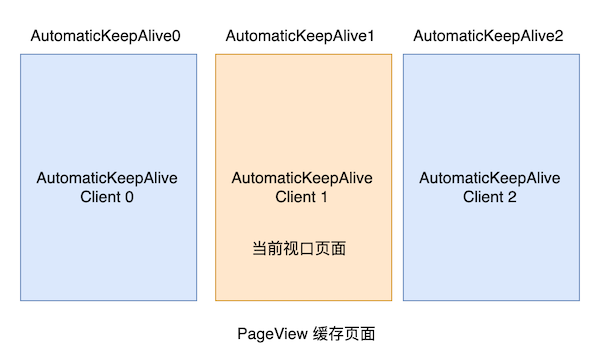
现在我们重新运行一下示例,发现每个 Page 页只会 build 一次,缓存成功了。需要注意,如果我们采用 PageView.custom 构建页面时没有给列表项包装 AutomaticKeepAlive 父组件,则上述方案不能正常工作,因为此时Client 发出消息后,找不到 Server,404 了,😀。
6.8.2 KeepAliveWrapper
虽然我们可以通过 AutomaticKeepAliveClientMixin 快速的实现页面缓存功能,但是通过混入的方式实现不是很优雅,因为必须更改 Page 的代码,有侵入性,这就导致不是很灵活,比如一个组件能同时在列表中和列表外使用,为了在列表中缓存它,则我们必须实现两份。为了解决这个问题,笔者封装了一个 KeepAliveWrapper 组件,如果哪个列表项需要缓存,只需要使用 KeepAliveWrapper 包裹一下它即可。
1
2Widget build(BuildContext context) {
3 var children = <Widget>[];
4 for (int i = 0; i < 6; ++i) {
5 //只需要用 KeepAliveWrapper 包装一下即可
6 children.add(KeepAliveWrapper(child:Page( text: '$i'));
7 }
8 return PageView(children: children);
9}下面是 KeepAliveWrapper 的实现源码:
1class KeepAliveWrapper extends StatefulWidget {
2 const KeepAliveWrapper({
3 Key? key,
4 this.keepAlive = true,
5 required this.child,
6 }) : super(key: key);
7 final bool keepAlive;
8 final Widget child;
9
10
11 _KeepAliveWrapperState createState() => _KeepAliveWrapperState();
12}
13
14class _KeepAliveWrapperState extends State<KeepAliveWrapper>
15 with AutomaticKeepAliveClientMixin {
16
17 Widget build(BuildContext context) {
18 super.build(context);
19 return widget.child;
20 }
21
22
23 void didUpdateWidget(covariant KeepAliveWrapper oldWidget) {
24 if(oldWidget.keepAlive != widget.keepAlive) {
25 // keepAlive 状态需要更新,实现在 AutomaticKeepAliveClientMixin 中
26 updateKeepAlive();
27 }
28 super.didUpdateWidget(oldWidget);
29 }
30
31
32 bool get wantKeepAlive => widget.keepAlive;
33}下面我们再在 ListView 中测一下:
1class KeepAliveTest extends StatelessWidget {
2 const KeepAliveTest({Key? key}) : super(key: key);
3
4
5 Widget build(BuildContext context) {
6 return ListView.builder(itemBuilder: (_, index) {
7 return KeepAliveWrapper(
8 // 为 true 后会缓存所有的列表项,列表项将不会销毁。
9 // 为 false 时,列表项滑出预加载区域后将会别销毁。
10 // 使用时一定要注意是否必要,因为对所有列表项都缓存的会导致更多的内存消耗
11 keepAlive: true,
12 child: ListItem(index: index),
13 );
14 });
15 }
16}
17
18class ListItem extends StatefulWidget {
19 const ListItem({Key? key, required this.index}) : super(key: key);
20 final int index;
21
22
23 _ListItemState createState() => _ListItemState();
24}
25
26class _ListItemState extends State<ListItem> {
27
28 Widget build(BuildContext context) {
29 return ListTile(title: Text('${widget.index}'));
30 }
31
32
33 void dispose() {
34 print('dispose ${widget.index}');
35 super.dispose();
36 }
37}因为每一个列表项都被缓存了,所以运行后滑动列表预期日志面板不会有任何日志,显示如下:
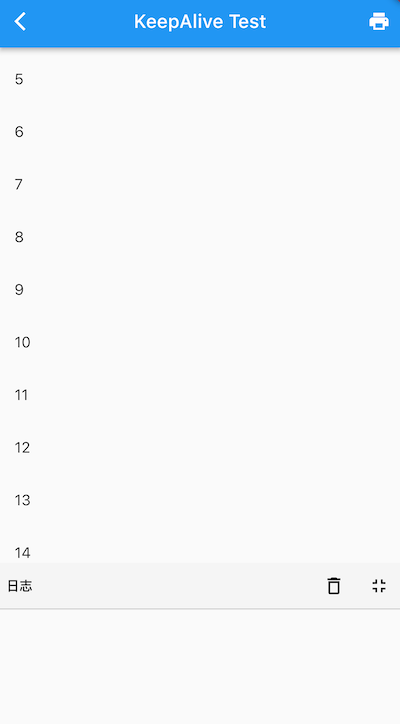
好我们预期一致,日志面板没有日志。如果我们将 keepAlive 设为 false,则当列表项滑出预渲染区域后则会销毁,日志面板将有输出:
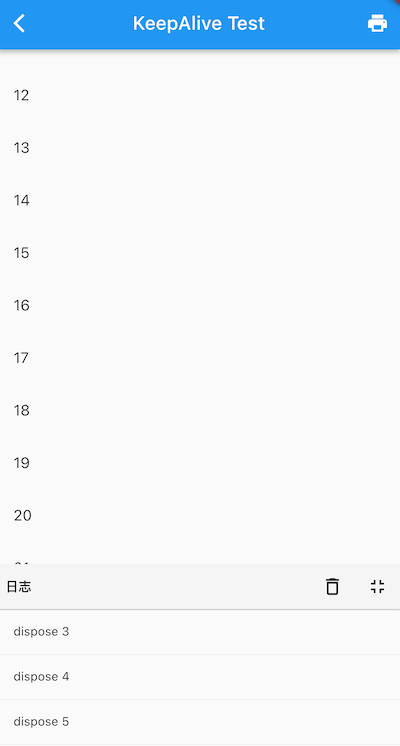
可见我们封装的 KeepAliveWrapper 能够正常工作,笔者将 KeepAliveWrapper 添加到了 flukit 组件库,如果读者需要可以在 flukit 组件库中找到它。